


Cat Translator – Human to Pet
4.31.02K Reviews
App Specs
- Version
- 8.7
- Updated On
- License
- Free
- Downloads
- 1,000,000+
- Developer
- Artpoldev
- Categories
- Entertainment
- Platform
- Android
Screenshots
 Analysis by AppCompare
When I want a playful way to get my cat’s attention, a soundboard can be more fun than another round of talking at them in my ordinary voice. Cat Translator – Human to Pet is built around that small, silly pleasure: it turns a spoken phrase into cat-like sounds, offers a collection of noises to try, and lets you record your own cat’s meows. I wouldn’t treat it as a genuine interpreter, but as a light entertainment app it gives curious owners an easy excuse to pause and play with their pets.
How the app fits into a cat owner’s routine
The app sits in the entertainment category, and that is the right way to approach it. Artpoldev’s current version is 8.1, and the app has been available since August 28, 2024. It is free to install, rated for Everyone, and has an average rating of 4.4 from around 138,000 ratings, with more than a million installs. In-app purchases range from $0.99 to $49.99 per item, so I’d check the purchase details before tapping anything that appears to unlock extra content.
That scale suggests plenty of people are willing to try the idea, but popularity doesn’t turn playful sound effects into reliable animal communication. The useful question is whether the app can make a few ordinary moments with a cat more engaging. For that, it helps to keep the phone volume comfortable, use the sounds briefly, and watch the animal rather than expecting a particular response. A relaxed glance or a curious ear flick is enough; ignoring the noise is also a perfectly normal cat reaction.
What the sound tools are good for
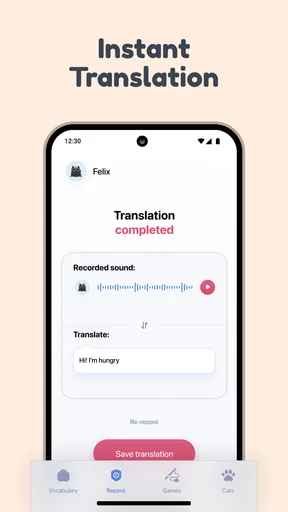
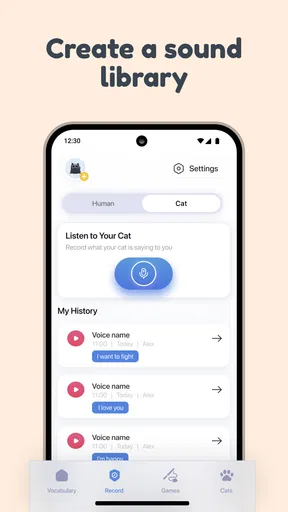
The central feature lets you speak into the app and hear a cat-like response. I’d use that as a novelty during a quiet moment, not as a way to issue instructions or test whether a cat understands a phrase. A spoken greeting followed by a meow may get a look, but the result is better understood as a prompt for shared attention than a translation with a fixed meaning.
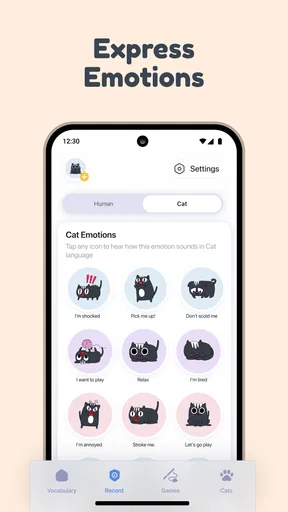
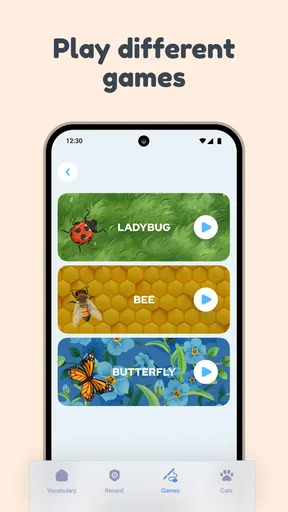
The built-in soundboard makes it easier to choose a cat noise without having to speak first. That can be handy when you want a quick playful sound during a break or while setting up a short play session. One practical tip is to try a sound once and then wait. Repeating it rapidly can turn a cute experiment into irritating background noise, while a pause gives you a clearer sense of whether your cat is interested or simply carrying on with its day.
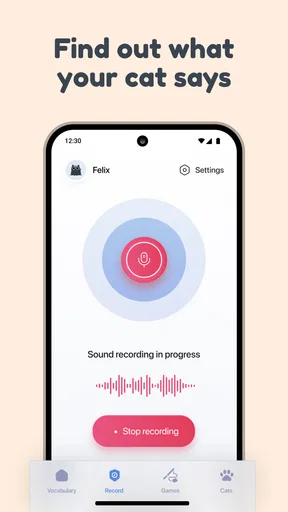
Recording your cat’s meows adds a different kind of amusement: it encourages you to notice the sounds your pet already makes. I’d treat any attempted decoding as a game, not a diagnosis of mood or need. If a cat is vocalizing because something is wrong, a novelty app cannot establish the cause. Look at the broader context—posture, routine, appetite, and surroundings—and seek appropriate animal-care advice when a change in behavior concerns you.
A realistic way to try it
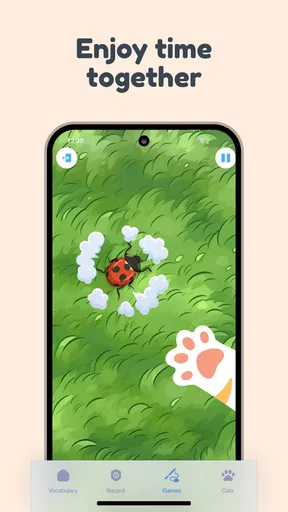
Imagine coming home after work while your cat is settled near a sunny window. Instead of launching into a long session, you could play one sound, give your pet room to choose whether to approach, and then switch to a familiar toy if they seem ready to interact. If the cat walks away, that is useful feedback too: the app can be closed, and the animal’s preference takes priority over the experiment.
Worth Reading Before You Choose

EA SPORTS FC Mobile 26 Is a Bigger Football Game, but It Takes Time

Flipboard Shows What News Apps Must Do Beyond the Feed

Switching to Android Auto Means Rethinking Your Driving Routine

Google Calendar Makes a Crowded Week Easier to Manage

Ludo King Makes the Most of the Minutes Between Plans

Baby Panda World Brings Quick Play to Modern Phones, but Its Game Library Feels Busy
This kind of short, low-pressure use is where I see the strongest case for the app. It can add a silly beat to playtime, give a child and a supervising adult something to laugh about, or help a new cat owner pay closer attention to vocal habits. It is less suitable for a cat that startles easily, is resting, or shows discomfort around sudden sounds. In those situations, quiet company and familiar routines are a better choice than trying another effect.
Where it differs from other options
Compared with ordinary cat videos or a generic collection of sound effects, this app brings speaking, cat noises, and the chance to record a pet’s meows together in one playful concept. That makes it more interactive than simply watching a clip, although it does not make the interaction more scientifically meaningful. A standard voice recorder is the better pick if your main goal is to keep a clear record of changes in your cat’s vocalizations; a toy or direct play is better if you want dependable engagement rather than a novelty sound.
There is also a useful trade-off in the app’s premise. Its human-to-cat framing makes the experience immediately understandable and amusing, but it can encourage people to read too much into a reaction. Cats respond to sound, context, and their own temperament, and a head tilt cannot tell you that a particular phrase has been understood. I enjoy the playful framing most when I keep that distinction in mind.
Who will enjoy it, and who may prefer something else
I’d recommend trying it if you already enjoy light pet apps, want a simple conversation starter with fellow cat lovers, or like experimenting with harmless sounds while your cat is relaxed. It may also suit someone who wants a small entertainment break that involves their pet rather than another screen-only activity. The app’s 8.1 version is the current release to look for, and it requires Android 8.0 or later; the free download keeps the first step easy, though optional purchases mean it is sensible to review any offer before buying.
I’d skip it if you need help understanding a health or behavior problem, want a dependable training method, or expect a translated message with a clear and repeatable meaning. It is also not the best choice for an animal that dislikes electronic sounds. A cat’s comfort matters more than getting a reaction, so stop if your pet seems tense, retreats, flattens its ears, or otherwise appears unsettled. The app is at its best when used as a brief invitation, not a demand for attention.
One question people often have is whether they need to be particularly good with technology. The experience is built around straightforward actions—speaking, choosing a sound, or recording a meow—so it should feel approachable to someone who is comfortable using a phone. Another practical question is whether a cat has to respond for the app to be worthwhile. I don’t think so: the entertainment can be in the attempt, as long as the owner doesn’t mistake silence or indifference for a failed translation.
What to keep in mind as you use it
The app’s history is still relatively recent, and version 8.1 gives a concrete point of reference for its present form. That tells me what version to look for, but it doesn’t by itself prove how the experience has changed over time or what may arrive next. For existing users, the sensible approach is to judge the current sound tools on their own merits rather than assume an update has made the app more accurate. I would watch for clear, practical improvements to the recording or sound-selection experience, while treating any expectation about future additions as just that—an expectation.
In day-to-day use, a few small habits make the experience better. Keep the volume modest, avoid playing sounds close to your cat’s ears, and don’t use the app to interrupt eating, sleep, or a moment when your pet is already anxious. If you want to compare meows over time, record them in similar everyday situations and make your own notes about what was happening; the surrounding context is more useful than an app’s playful label by itself. That approach turns the recording option into a prompt for attentive observation without pretending it can replace a vet or behavior professional.
There is a limit to how much I’d ask from the app even on a good day. Sound effects may be amusing, but they can’t replace toys, routine, patience, or learning how an individual cat communicates. If a cat responds once and ignores the next sound, that inconsistency is not a flaw that needs fixing; it is a reminder that the animal is not following a script. I would use the app sparingly enough that the sounds stay novel and let the cat decide whether to participate.
My take after trying the idea
First things first, downloading the Cat Translator – Human to Pet app was a breeze. Available on both Android and iOS, it’s just a matter of heading to your app store and hitting that install button. Once it's on your phone, you're greeted with a simple interface that's user-friendly and straightforward. No need to be a tech wizard here!
Features at a Glance
One of the standout features of this app is its ability to "translate" human speech into cat sounds. You simply speak into the app, and it offers a variety of meows and purrs in return. It's like having your own digital cat voice at the ready!
Another nifty feature is the soundboard that comes pre-loaded with a selection of cat noises. From soft purrs to playful chirps, it’s all there. You can use these sounds to interact with your cat or just to have a bit of fun.
For those who really want to go above and beyond, there’s an option to record your cat’s meows and attempt to decode what they might be trying to say. While it’s all in good fun, it’s a feature that adds an extra layer of engagement with your pet.
Putting It to the Test
So, how does it fare in practice? Armed with my phone and the app, I approached my cat, Whiskers, who was lounging in his usual sunlit spot. I gave it a go by saying, "Hey there, buddy!" and let the app do its magic. The resulting meow was met with a curious head tilt from Whiskers, which I took as a good sign.
Over the next few days, I experimented with different phrases and watched Whiskers' reactions. Sometimes he seemed intrigued, other times nonchalant, but that’s cats for you! The soundboard was particularly handy during playtime, adding a fun twist to our usual routine.
Recording his meows and attempting to "translate" them back was a bit hit or miss, but it definitely sparked some amusing moments. It’s clear the app is more about entertainment than exact science, but isn’t that the point?
Is It Purr-fect?
While the Cat Translator – Human to Pet app might not make you a certified cat communicator, it’s a delightful tool for any cat lover. It offers a playful way to interact with your pet and is bound to bring a few laughs along the way.
If you’re expecting to have deep philosophical discussions with your cat, you might need to adjust your expectations. But for a bit of light-hearted fun and perhaps a new way to engage with your furry friend, this app is definitely worth a try.
In conclusion, if you've ever wondered what your cat might say if they could talk, or if you simply want to amuse yourself and your pet, the Cat Translator is a paws-itively entertaining choice. So why not give it a whirl and see if it brings you and your kitty closer together?
Pros
- Fun and engaging for cat lovers
- Simple and intuitive interface
- Wide variety of cat sounds
- Entertaining for both pets and owners
- Easy to share recordings
Cons
- Ads can be intrusive at times
- Limited free features
- Requires internet for full access
- Not scientifically backed
- Some sounds may confuse pets
FAQs for Cat Translator – Human to Pet
What is Cat Translator – Human to Pet and how does it work?
Cat Translator – Human to Pet is a fun app designed to help you communicate with your feline friends. It works by converting human speech into meows, mimicking cat sounds. While it’s not scientifically proven to translate your words into cat language, it provides an entertaining way to interact with your pet and see their reactions.
Is Cat Translator – Human to Pet safe for my cat?
Yes, the app is safe for your cat. It plays recorded cat sounds, which are not harmful. However, it's essential to observe your cat's reaction. If your pet seems stressed or agitated by the sounds, it's best to discontinue use and ensure their comfort and well-being.
Does Cat Translator – Human to Pet require internet access?
The app does not require internet access for basic functionality. Once downloaded, you can use the translation features offline. However, some features, such as updates or additional sound packs, may require internet access to download or access them.
Can I use Cat Translator – Human to Pet with other pets?
While the app is primarily designed for cats, you can certainly try it with other pets. However, keep in mind that the sounds are tailored specifically to cats, and other animals may not respond as expected. Always monitor your pet’s reaction to ensure they are comfortable and not stressed.
Are there any costs associated with Cat Translator – Human to Pet?
The app is free to download and use for basic features. However, there might be in-app purchases available for additional features or sound packs. Check the app store listing for detailed information on any costs associated with premium features to ensure it fits your budget.


